Skip to content

Features · ten stages, invite to payday

Every creator, contract and video has an owner and a next step.

Nobody asks “where are we with her?” again. Ten stages from invite to payday, then renewals, with chat throughout, for your team and your creators.

The pipeline

One creator, start to finish. Pick any stage, or let it play.

01 / 10Brand

Invite with a contract

Send the terms with the invite. The creator gets an account only after they sign.

Act 1 · Contract

Signed before anything starts. Terms, sample and brief, agreed up front.

AInvite·Brand

Invite with the deal already attached.

Every invite carries the contract: fee, number of videos, dates, revision rounds and products. Start from a template and adjust per creator. The creator doesn’t get an account until they sign, so nobody is “half onboarded”.

  • Contract templates you reuse across creators
  • Fee, videos, dates, rounds and products in one form
  • Deals already in progress: enter the terms and progress, upload the signed agreement, the creator confirms
  • One creator can work with several brands on one login
BSign·Creator

Signed on the phone, kept on file.

The creator opens a link, reads the terms in a plain layout and e-signs. Both sides get the signed copy. Each contract is stored as a print-ready document with a SHA-256 fingerprint, so you can always show it hasn’t changed.

  • Signing link, no account needed to read
  • Signed copy emailed to both sides
  • Print-ready contract page with a fingerprint

CSample·Brand + creator

Ship the sample. Start the clock when it lands.

Track every sample from request to shipped. When the product arrives, the creator taps “arrived” and the first-draft deadline counts from that day, on both screens. Product value is frozen at ship time, so creator cost stays accurate.

  • “Arrived Oct 14 · first draft due Oct 21” on both sides
  • Product value counted in creator cost
  • No more “did it arrive?” messages

DBrief·Brand

Briefs that separate the must-haves from the freedom.

Tell creators what has to be in the video and where they can make it their own. An Ideas library keeps hooks and angles worth repeating in one place. Creators see the ideas, never the numbers behind them.

  • Must-haves vs creative freedom
  • Ideas library, text-only for creators
  • The brief is the reference when a note looks like a new ask

Act 2 · Review

Drafts in, feedback out, approved. Fair rounds, then codes ready for ads.

EDraft·Creator

Drafts straight from the camera roll.

Creators upload drafts from their phone, choose the product and send. Uploads resume after an app switch or a dropped signal. Every version is kept: v1, v2, v3.

  • Resumable phone uploads
  • Version history on every video
  • Drafts land in your queue with a poster frame

FReview·Brand

Feedback creators can act on.

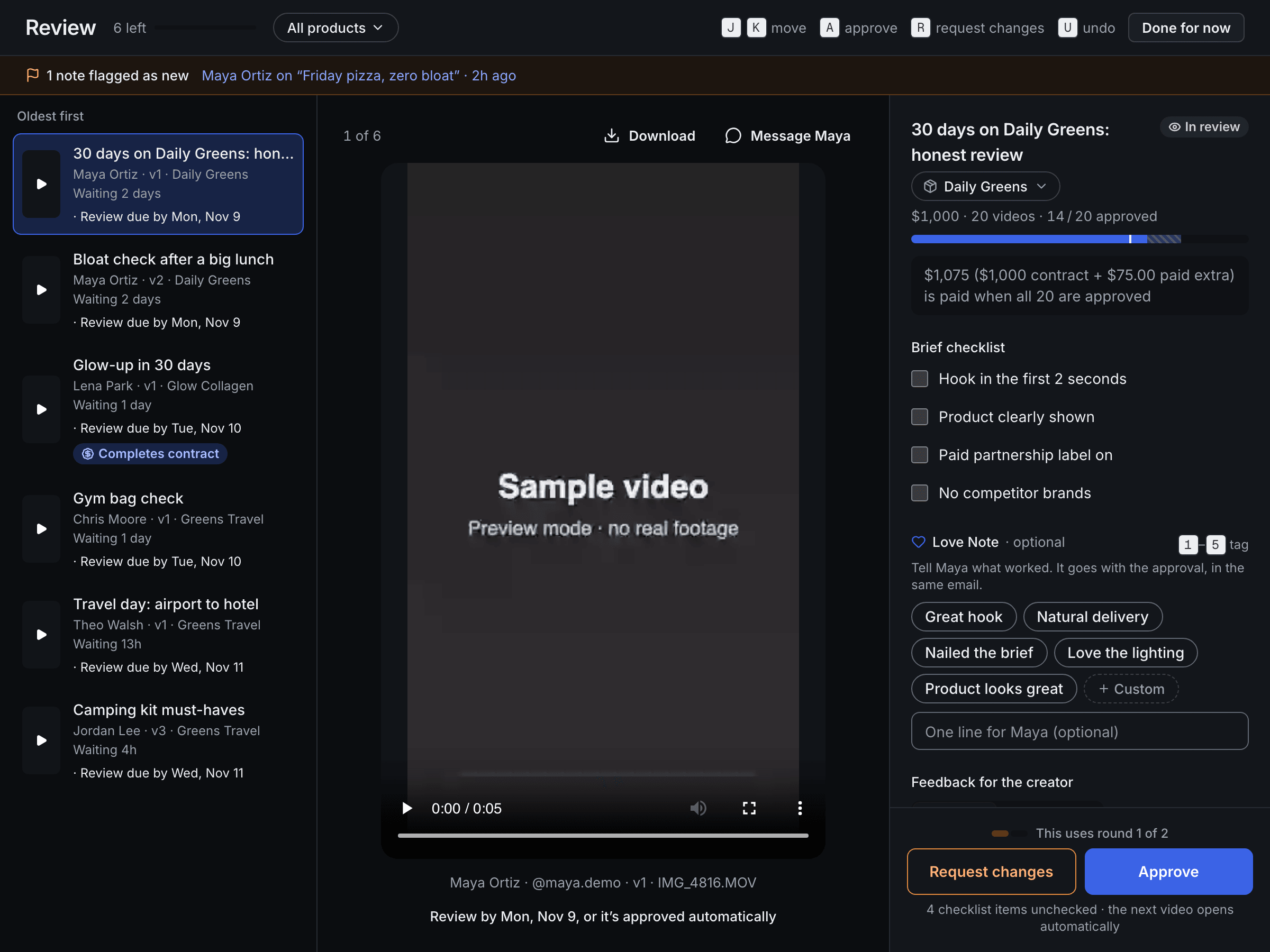
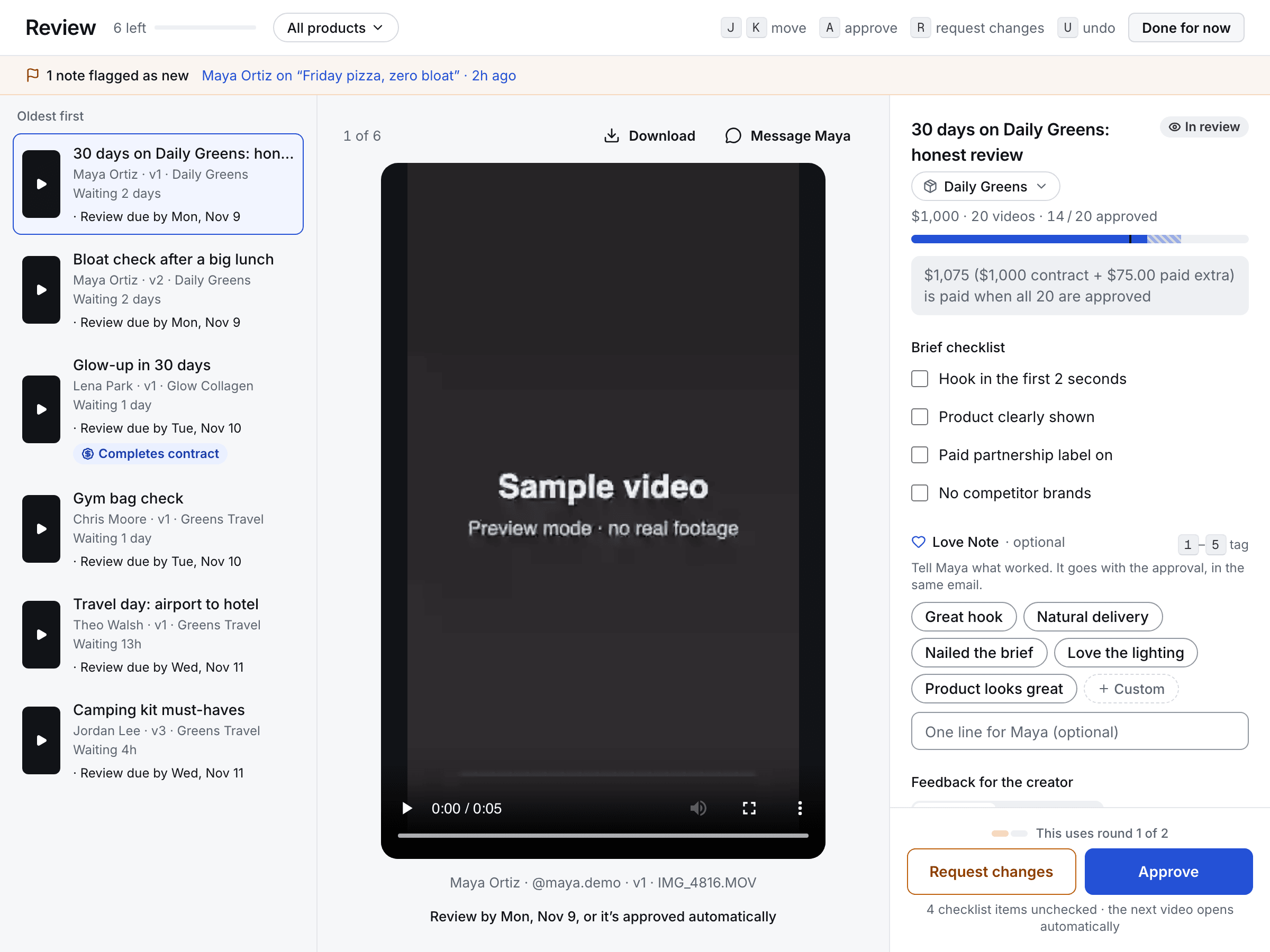
Mark each note as a must-fix or a suggestion. Pin it to a moment in the video, or record a voice note. Creators get a checklist of must-fixes and a separate list of “your call” suggestions. Revision rounds come from the contract and both sides see them. If a creator flags a note as new, you decide fairly: make it optional, point to the brief, or pay for the extra.

  • Must-fix vs suggestion
  • Timestamped notes and voice notes
  • Revision rounds from the contract, extra round on request
  • “New ask” flag with three fair answers
  • J / K to move, A to approve, R to request changes, U to undo
Review
The Review queue: drafts oldest first, a sample video, and the brief checklist with approve or request changes.

GApprove·Brand

Approve in one key. Say what you loved.

Approving tells the creator what’s next and moves the contract toward payday. Add a Love Note (“Great hook”) and it rides along in the approval email. Creators keep every note on their profile under Kind words. A guard keeps performance talk out of notes, so creators are praised for craft, not your sales.

  • One-key approve with undo
  • Love Notes in the approval email
  • “Completes contract” tag shows when a payout becomes due

HPost + Spark·Brand + creator

Spark codes, sorted by product.

After approval the creator posts and submits the TikTok link and Spark code, tagged to the product. Codes land in one queue, grouped by SKU, with expiry. Copy every ready code for one product in a click and paste it into Ads Manager. With TikTok Ads connected, codes are added to your ad account’s authorized posts for you.

  • Group by product, filter by SKU
  • Copy all ready codes for a product
  • Expiring codes flagged before they lapse

Act 3 · Money

Worth it, and paid on time. Profit per creator, then payday.

IProfit·Brand Brand only

See which creators cost more than they made.

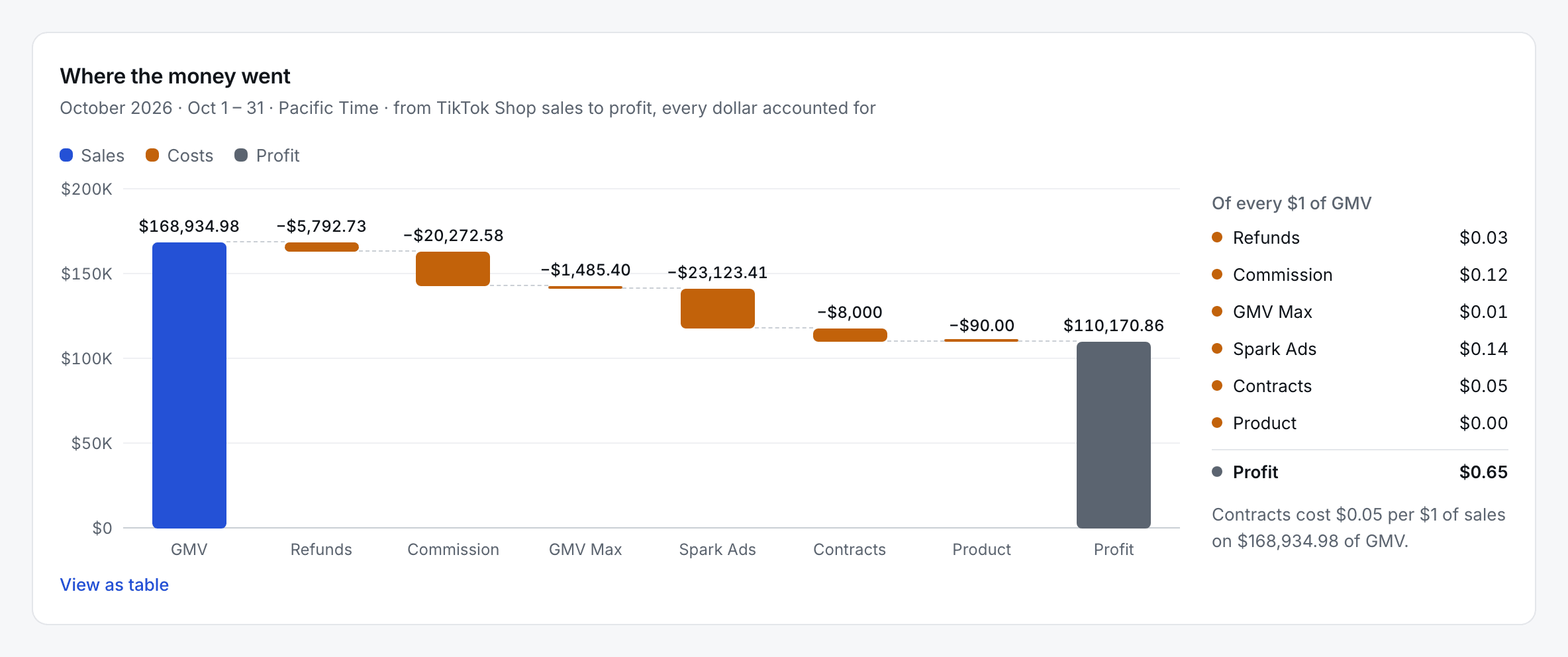
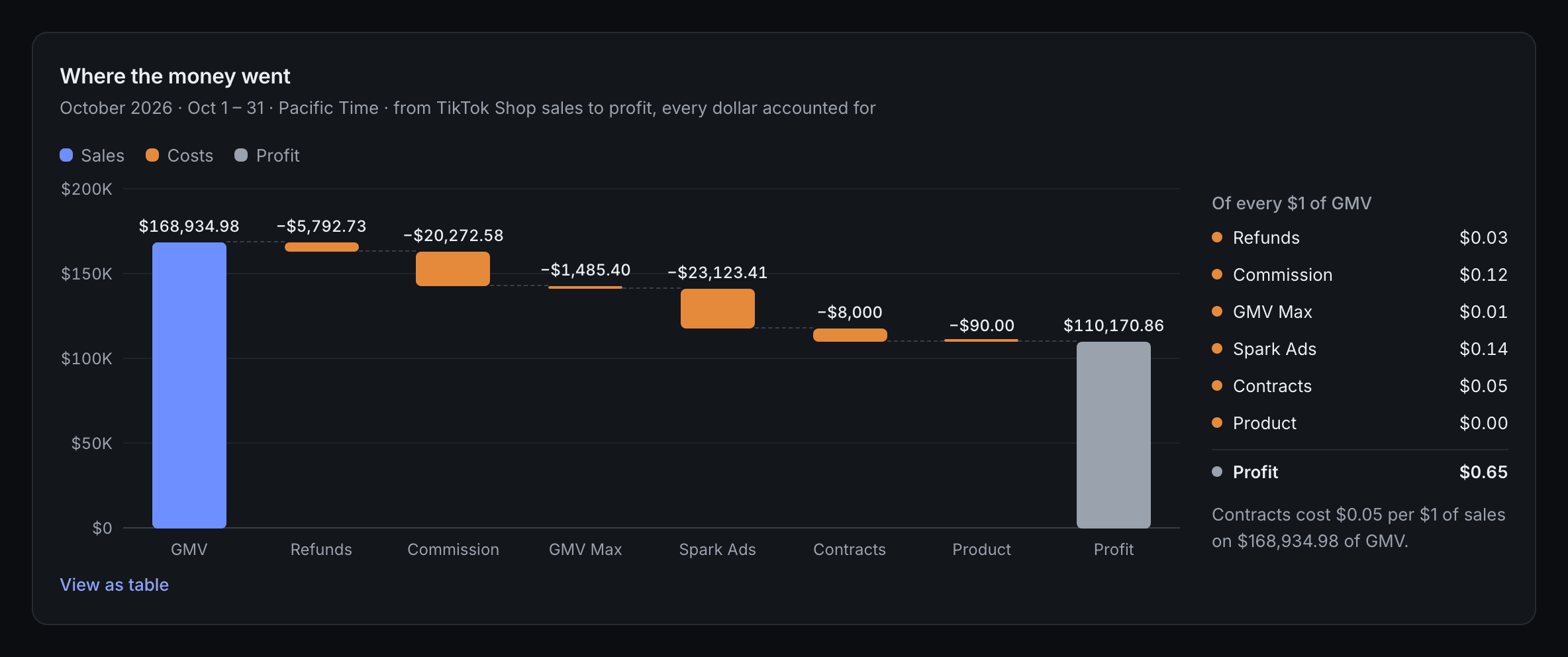
A waterfall takes every dollar from TikTok Shop sales down to profit: refunds, commission, GMV Max, Spark Ads, the creator’s fee and product sent. Sort the Creator P&L by profit, open a creator, and see a suggested verdict: Scale up, Keep, Renegotiate or Drop. Per video, too. Creators never see any of it.

  • Profit waterfall, every dollar accounted for
  • Creator P&L and profit per video
  • Verdicts: Scale up, Keep, Renegotiate, Drop
  • Connects to TikTok Ads, TikTok Shop and GMV Max
Where the money went · brand only
Where the money went: a waterfall from TikTok Shop sales through refunds, commission, GMV Max, Spark Ads, creator contracts and product down to profit.

JPayday·Brand + creator

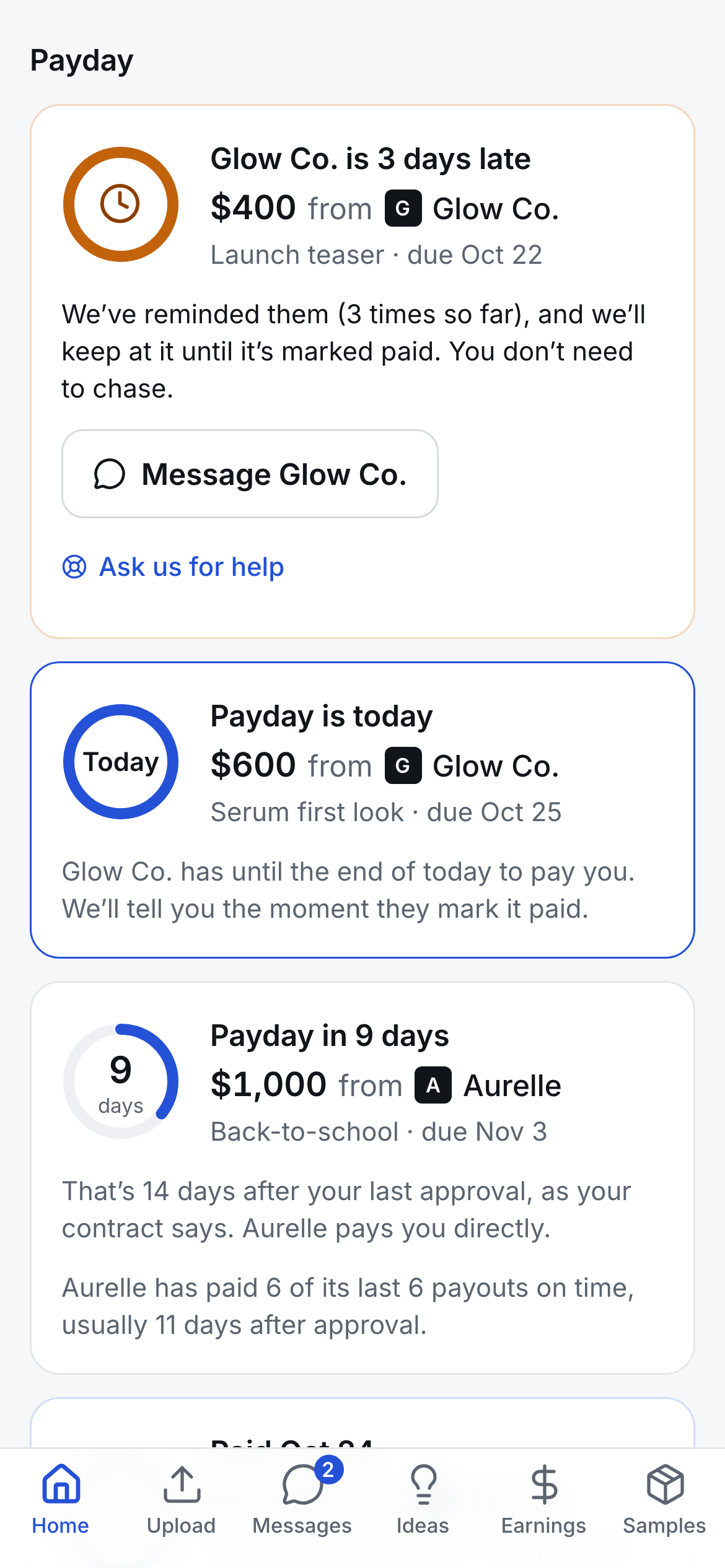
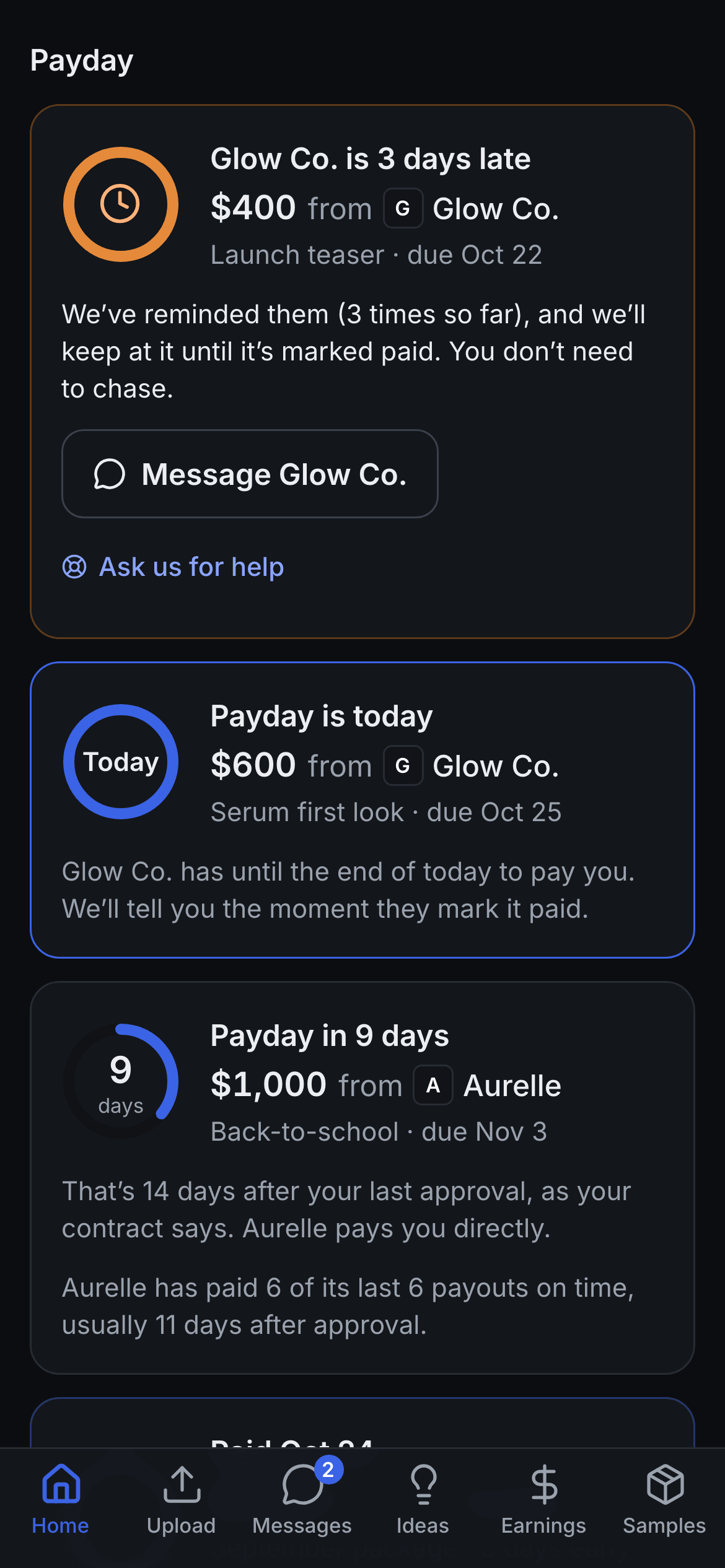
Paid in full when the work is approved. On time.

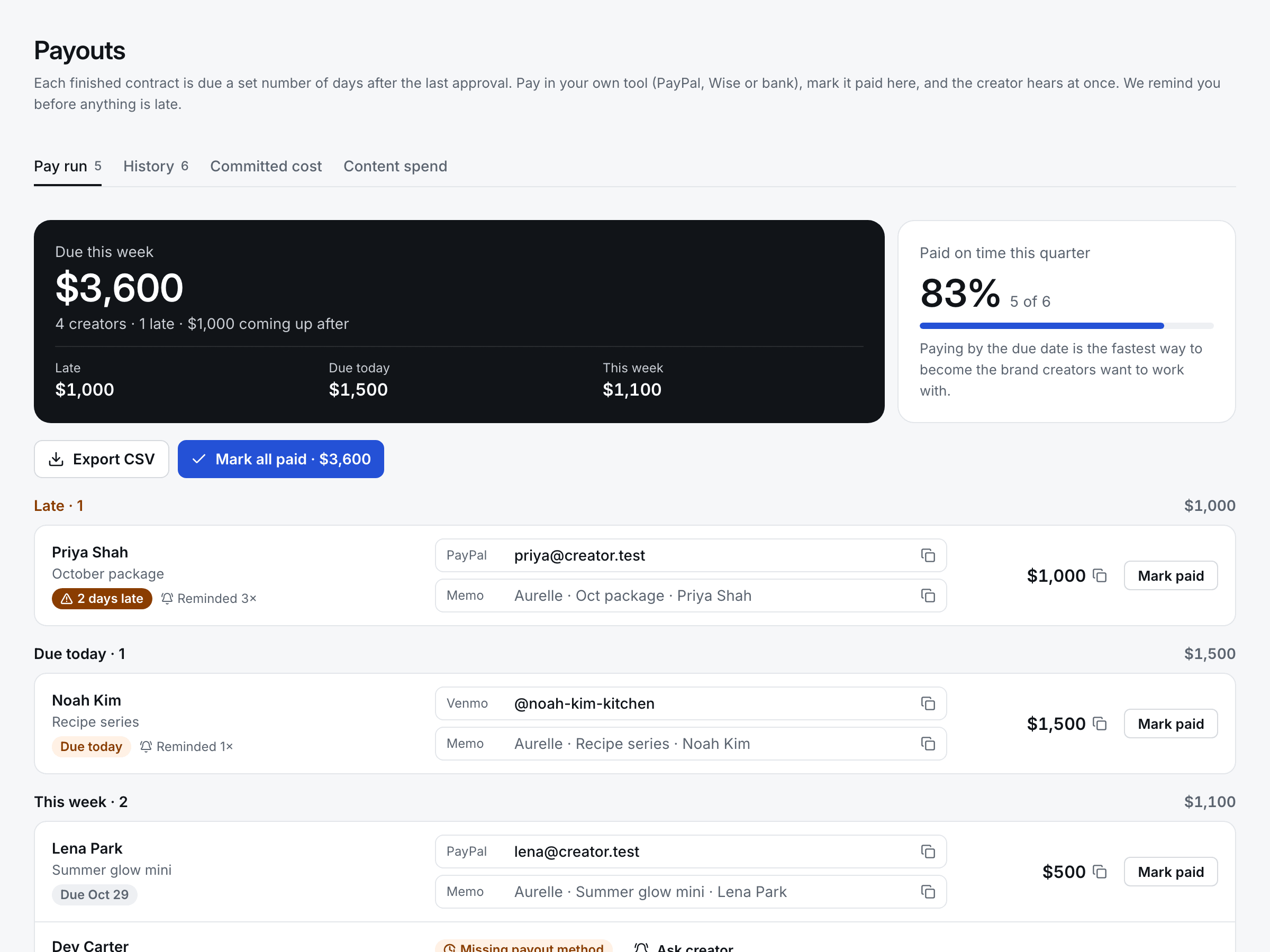
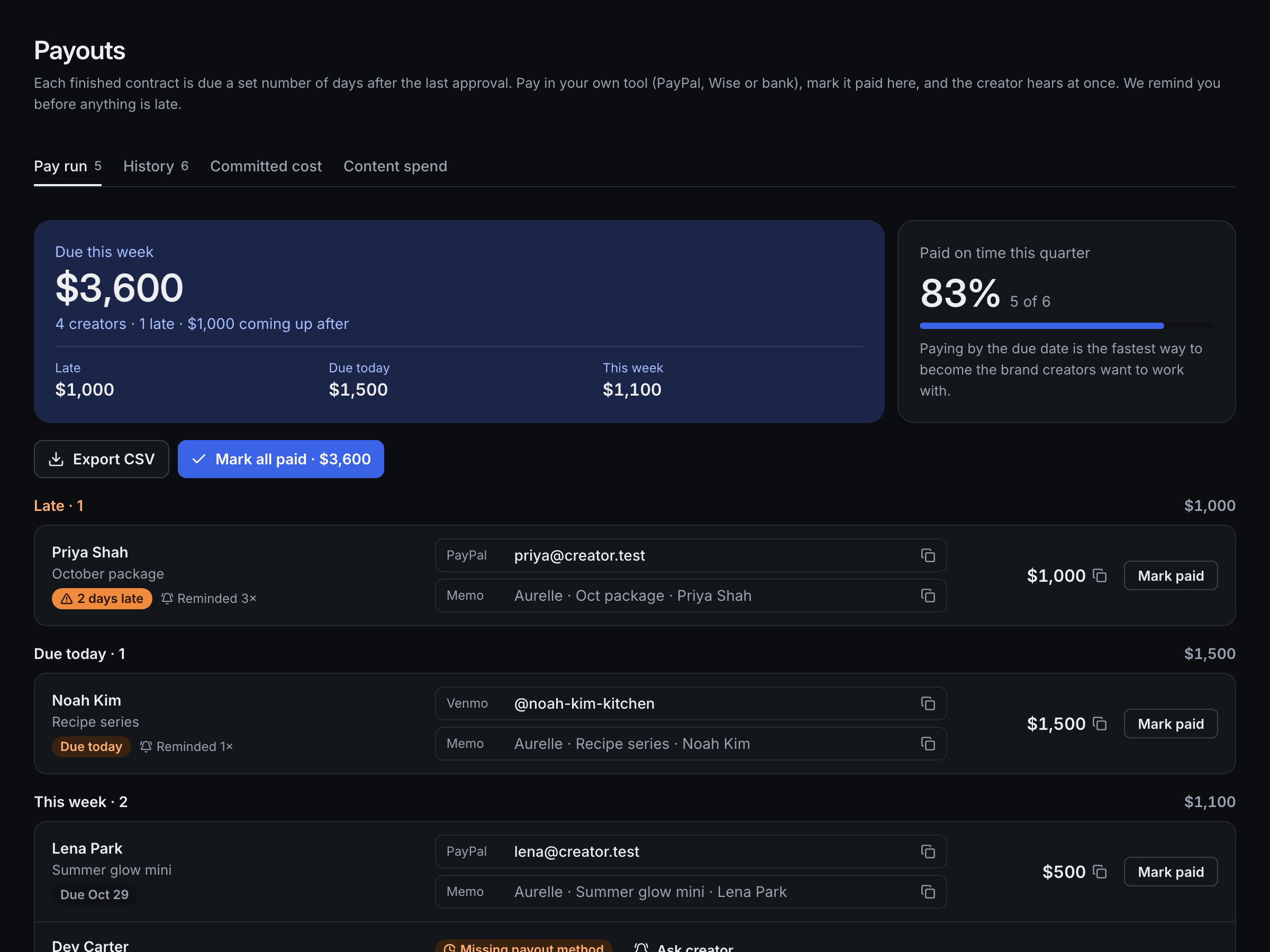
When every video in a contract is approved, the payout is created and its due date counts down, for you and for the creator. The Pay run lists what’s late first, then due today, then this week. Copy the payout email, amount or memo with a tap, pay in your own tool and mark it paid with a reference. Reminders go out before anything is late, so creators never have to ask.

  • Pay run: late first, then due today, then this week
  • “Ask creator” when payout details are missing
  • Mark paid with a reference, one at a time or all at once
  • Creators get a tax-year statement (print or CSV)
  • You pay creators directly; the app keeps the record
Pay run
The Pay run: what is due this week, late payouts first, with the payout email, memo and amount ready to copy and a Mark paid button.

↺Renew·Always on

Keep the creators worth keeping.

The relationship radar shows who has waited on you, whose contract ends with no renewal, and who is replying slower than usual. Anniversaries and finished contracts prompt a note or a bonus. Renewing is one step from the creator’s page.

  • Relationship radar
  • Anniversary and milestone prompts
  • Thank-you bonuses, tracked with payouts

·Chat·Always on

Talk to creators where the work is.

Built-in brand ↔ creator messages, shared by your team. Live on both sides, with an email when a message sits unread. No more scrolling a group chat for “the one with the blue jar”.

  • One thread per creator, shared by your team
  • Live on desktop and phone
  • Unread messages emailed after a few minutes

On every plan

The small things that keep a program moving.

  • Pace and reminders

    On track, behind, overdue. Nudges go out before anyone has to chase.

  • Today, ranked

    What needs you first: money, then deadlines.

  • Team roles

    Owners, admins and ads managers, each with the right access.

  • Keyboard-fast

    J and K to move, A to approve, ⌘K for everything.

  • Built-in chat

    One thread per creator, shared by your team.

  • CSV exports

    Payouts, content spend and orders, for your books.

Start with one creator.

Invite your next creator with their contract attached, and run the rest from there.

3-day free trial · No card required · Cancel anytime